
Key takeaway
Choose a Nutrition Facts format only after the market, product state, serving details, and available package space are clear enough to review together.
Start with the market and the finished product state
Do not begin by asking whether a vertical, tabular, or linear panel looks best. Start with the market you are preparing for, the finished food customers receive, and whether the product has a presentation that needs more specific review. U.S. FDA-style and Canadian label workflows should be treated as separate contexts rather than as interchangeable layouts.
The product state matters too. A product that is sold in one finished form creates a different review question from one that is prepared before eating, comes in multiple varieties, or has a special audience. Confirm those facts before treating any preview as the format you will carry into package design.
- Confirm the market and intended consumer audience first
- Describe the product as it is sold and, where relevant, as it is prepared
- Identify multiple varieties or other product conditions before narrowing the format
Stabilize serving and nutrition details before comparing layouts
A format preview is only useful when the serving size, servings per container, and nutrition values describe the same active product version. If those inputs are still moving, a tabular or linear preview may look efficient while showing values that will change before packaging review is complete.
Treat the format selector as a way to inspect how reviewed information is presented, not as a shortcut around the serving and data review. Reopen the label preview whenever a recipe, serving plan, product size, or package quantity changes.
- Use reviewed per-serving values from the active product version
- Keep package quantity and servings per container visible during comparison
- Recheck every preview after material recipe, serving, or package changes
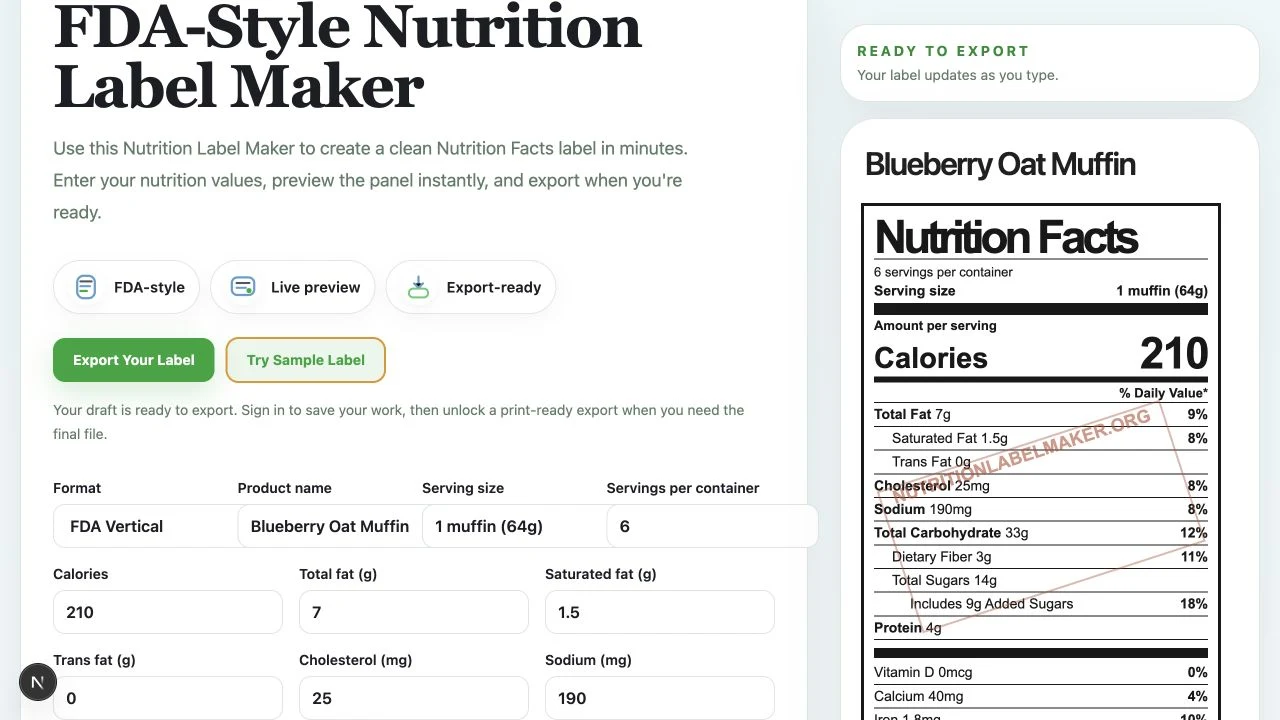
Comparison baseline: FDA Vertical
Begin with a stable set of product, serving, and nutrition values. The FDA Vertical preview gives the team a complete baseline panel to inspect before considering a different layout.
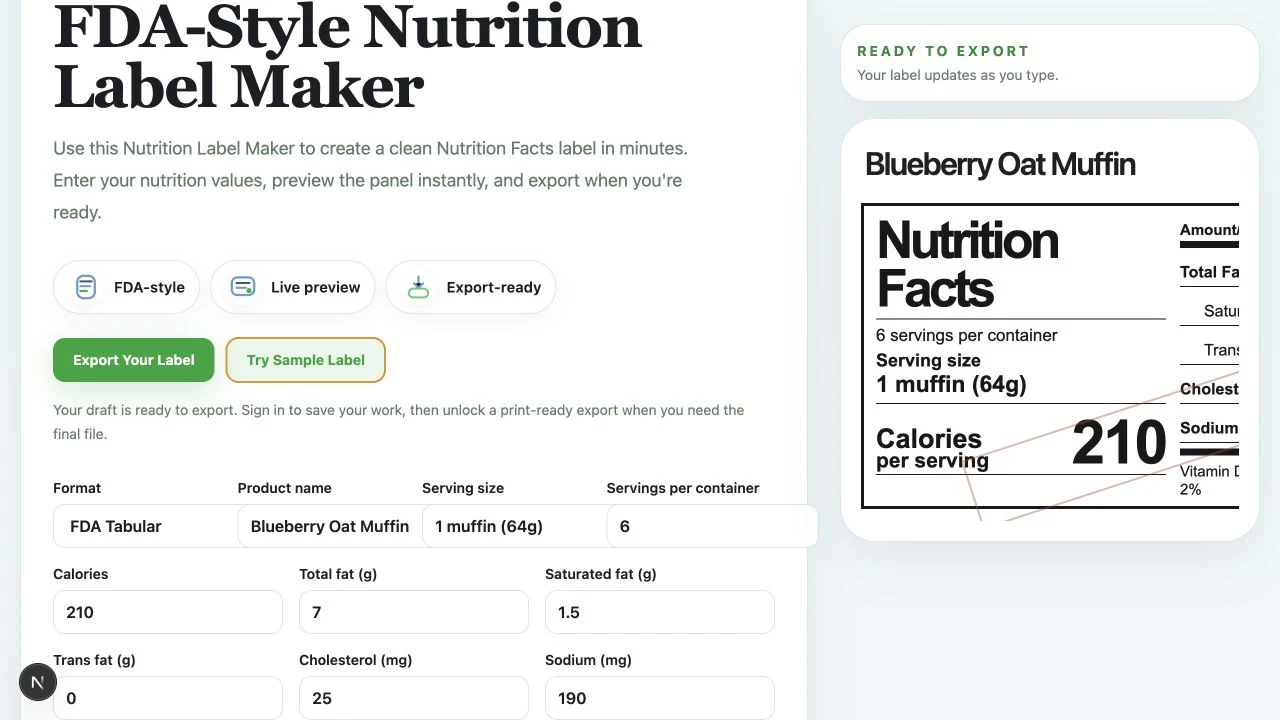
Comparison view: FDA Tabular
Switching to FDA Tabular changes the shape and use of width for the same sample data. Compare that change against the actual package area and nearby packaging content, not against an empty mockup.
Compare vertical, tabular, and linear views against real package space
Vertical is often the clearest starting view for a standard panel review because it gives the label information a familiar top-to-bottom reading order. It is a useful comparison point when there is enough vertical space on the package and the team needs to inspect each row closely.
Tabular and linear previews change the way the same information uses width and height. They can help a team inspect whether a different layout may fit the available package area, but they should be compared using the actual product data and surrounding package content, not an empty sample panel. The preview is a review aid; final format decisions still need to be checked against the requirements that apply to the product.
- Use vertical as a clear baseline for comparing the complete panel
- Compare tabular or linear views with the actual package dimensions and nearby content
- Keep readability and required review details in scope, not only the smallest possible footprint
Escalate aggregate and as-packaged or as-prepared cases early
Some products need a format review that goes beyond a single standard panel. Multiple varieties, products with more than one presentation, or foods that are prepared before eating can introduce additional format and data questions. Do not force those products into a standard preview simply because it is the quickest layout to generate.
Use the relevant aggregate or as-packaged or as-prepared preview to organize the discussion, then have qualified reviewers confirm the category, data, wording, and final packaging treatment. The goal is to surface the special case early, before a designer is asked to fit an incomplete decision into production artwork.
- Flag multiple-variety products before the package layout is finalized
- Keep as-sold and prepared-state data separate during review when both matter
- Treat the preview as a shared review surface, not final regulatory approval
Common mistakes
- • Choosing a format only because it looks compact before the market and product state are confirmed
- • Changing the package layout without reopening the serving and label preview review
- • Treating a clean preview as proof that the selected format is appropriate for the finished package
Review checklist
- • The target market and product audience are confirmed before format review
- • Serving size, servings per container, and nutrition data come from the active product version
- • The selected preview is checked against the actual package space and surrounding packaging content
- • Special product states, multiple varieties, and final regulatory questions receive qualified review
FAQ
Should I choose a Nutrition Facts format before I calculate serving size?
No. Confirm the product, serving size, and servings per container first. Those inputs affect the information shown in every format preview.
Is FDA Vertical always the right choice?
No. It is a useful baseline for reviewing a standard panel, but the final format depends on the applicable market, product facts, package space, and requirements that apply to the finished product.
Can I use the same label format for U.S. and Canadian packaging?
Do not assume that. Treat U.S. FDA-style and Canadian Nutrition Facts label review as separate market workflows, then confirm the applicable format and surrounding packaging requirements for each market.
Does the label generator decide which format is compliant?
No. The generator helps you compare available previews using the data you provide. You remain responsible for confirming the final format, product facts, and labeling requirements before production.
Official sources
Related guides
How to Calculate Serving Size for Nutrition Labels
A practical FDA serving-size guide for turning a finished product, its category, and its real measurements into a review-ready label serving.
What Is a Net Quantity Statement? A Practical Guide for Food Labels
Net quantity is the amount of product in one retail package. Keep it separate from the serving plan, servings per container, and total recipe yield.
How to Calculate Nutrition From a Recipe
A practical guide for turning recipe ingredients, batch yield, and serving logic into per-serving nutrition values that are ready for label review.
How to Make a Nutrition Facts Label
A step-by-step guide for small food brands learning how to make a nutrition label and turn recipe data into a Nutrition Facts label preview.
FDA Nutrition Label Requirements: What Small Food Brands Should Review
A practical review guide for understanding FDA-style Nutrition Facts label structure, nutrition label requirements, and common mistakes.